How to Update a Black Friday Offer Across Channels
When a bundle sells out or the terms change, fix the whole shopping journey. Use one clear replacement message and test the old links customers still have.
In this guide
The bundle sells out at 10:15 a.m. By 10:20, the product page is updated. At 10:30, the scheduled email lands in thousands of inboxes promising that same bundle. Someone opens the campaign chat and writes, ‘Did we turn everything off?’
That's the moment an ecommerce team needs one person to own the change. Updating a product page is useful, but shoppers are still arriving through ads, saved emails, creator posts and links your team stopped thinking about yesterday. I'd follow those paths before replacing the offer with another loud announcement.
Make the new decision before writing the new copy
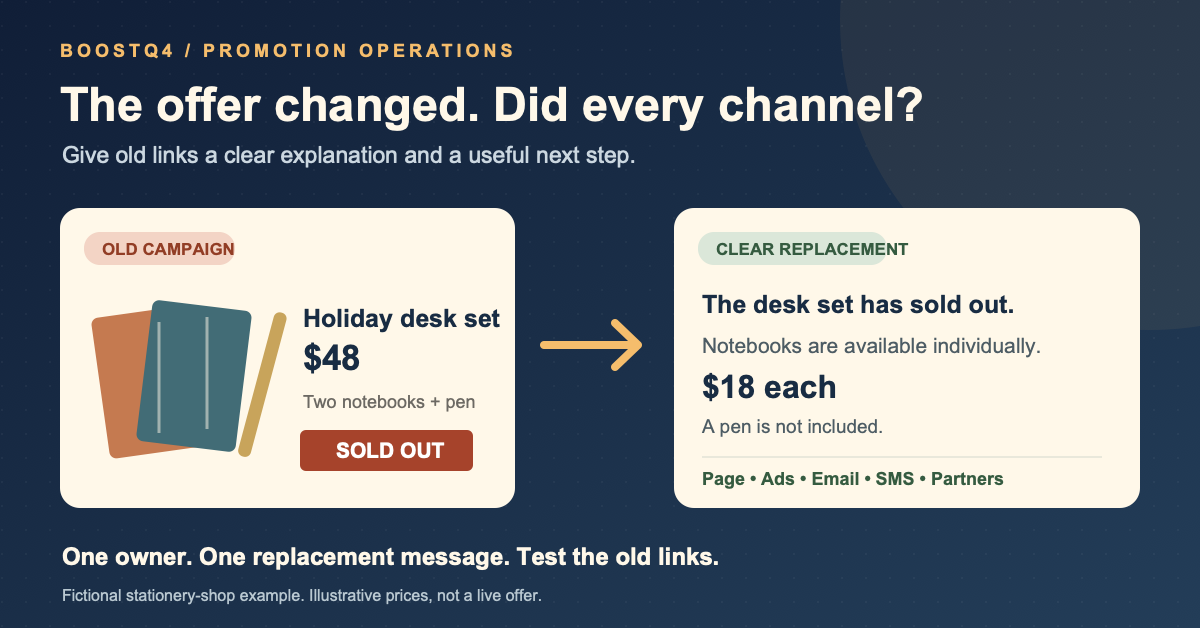
Imagine a fictional stationery shop selling a holiday desk set for $48. It includes two notebooks and a pen. The pen runs out, so the complete set is no longer available. There are still plenty of notebooks to sell.
The first decision is what the shop can actually offer now. In this example, it will sell notebooks individually for $18 each. It will not quietly replace the pen or advertise two notebooks as the original set. Check the stock, price and margin for the replacement before asking the creative team to promote it.
Then give everyone the same short explanation: ‘The $48 holiday desk set has sold out. Notebooks are still available individually for $18 each. The individual notebooks do not include a pen.’ Those are fictional prices for this example, not a pricing recommendation.
That message does three jobs. It explains why the shopper cannot find the old offer, identifies the available alternative and removes the most likely misunderstanding. ‘New holiday deal!’ does much less for someone who came looking for the set.
Give the old link a useful destination
An email already delivered is still an invitation to visit. So is a saved creator post. Turning off the next send doesn't change the message someone received this morning.
I'd keep the old campaign destination understandable. For our shop, the page could open with: ‘The holiday desk set has sold out. You can still shop the notebooks individually below. A pen is not included.’ Show the current options, their actual prices and a clear route to choose one.
Don't redirect every old link to the homepage and hope the shopper solves the puzzle. If you must change the destination, choose a relevant page that explains the change. Check how the actual platform handles unavailable variants, old discount codes and saved carts. A proposed message is only useful if the page can support it.
Give existing orders their own review. The replacement campaign is about future purchases. It does not answer what to do for somebody who already paid for the original set. Have the responsible operations or customer-service person resolve those orders and the appropriate communication separately.
Replace the campaign, not just the banner
Use a small change brief that names the old promise, the new promise, the affected product and the owner. Then list the places where that promise appears. For the desk set, I would start with these five:
- Paid ads and product feeds that still promote the set. Pause or replace affected creative using the controls the current accounts support.
- Scheduled email and permitted SMS messages. Check the actual message, audience, send time and destination rather than relying on a campaign name.
- Automated follow-ups that mention the set or its price. Include the abandoned-cart branch and any saved promotional templates.
- The campaign page, product options, popup, cart and checkout. Look for the old image as well as the old words.
- Affiliate and creator placements the brand can identify. Send the relevant partners the exact change and a clear next action.
The useful record says, ‘Desk-set reminder paused at 10:32 by Maya; replacement email awaiting review.’ A row that says ‘email done’ leaves the next person guessing. These names and times are part of the fictional example.
Changing an ad can involve review or delivery delays. Don't promise the whole campaign has changed everywhere because one person clicked Save. Record what was changed and what is still waiting to take effect.
Make the partner update easy to use
A publisher cannot fix a placement they don't know has become inaccurate. Give them the affected product, the exact old claim, the available alternative and the destination to inspect. Avoid forwarding a long internal conversation and asking them to work out what matters.
For our fictional shop, the message could be:
‘The $48 holiday desk set has sold out. Please stop promoting that set and remove the claim that a pen is included from any replacement notebook promotion. Notebooks are available individually for $18 each at the product page linked below. Please review the current page before changing your placement. Let us know if you cannot edit the existing post or need different creative.’
Add the real approved destination and asset before sending. Check whether the existing partnership needs a new agreement for the requested work. If you have not confirmed a detail, say that you are checking it rather than giving a partner a confident guess.
The goal is a useful correction the partner can act on. Keep track of which placements were updated, which cannot be edited and which are still awaiting a response.
For a wider publisher review, AffiliateFinders supports publisher discovery and contact research. Confirm the actual placement owner before requesting a change.
Test the path a disappointed shopper would take
Open the old email on your phone and follow its original link. Find the product through an active ad or permitted preview. Open the partner destination. Use a saved cart if your test setup allows it.
Can you tell immediately what happened to the set? Can you distinguish the $18 notebook from the former $48 bundle? Does the cart show the right item and price? Does an old code produce a useful explanation rather than a mystery error?
Test the actual supported journey with authorized test data. Don't create real orders or send marketing messages just to make a checklist look complete. Save the visible page and final cart state so the person approving the change can inspect the same experience.
Finish with one clear handover: what is now live, what remains paused, what still needs approval and who is watching the outstanding items. Then decide whether the original campaign can resume with revised creative or needs a different plan entirely.
Use the contribution-margin guide before choosing the replacement offer, then run the ad-to-checkout checks on the revised journey.
For your next promotion, choose one offer and write its change brief before launch. You don't need to predict every stock problem. You need to know who can change the promise, where that promise appears and how you'll verify what customers see. That's a much calmer starting point than ‘Did we turn everything off?’
Read the replacement from an old email and a saved cart
In the fictional offer change, open the old email and confirm its link explains that the $48 set sold out and points to the $18 notebook with the new terms. Replace the queued message before release and reopen a saved set cart to inspect the sold-out message. Keep existing order commitments in the customer-service record.
After you have corrected the message, run the landing page QA checklist from an old ad or email through checkout.
Bring one live promotion to the review
Experience Advertising can help connect your advertising, offer messaging and shopping experience. Start with the campaign customers are seeing today.